
The Beginner's Guide to FDM 3D Printing
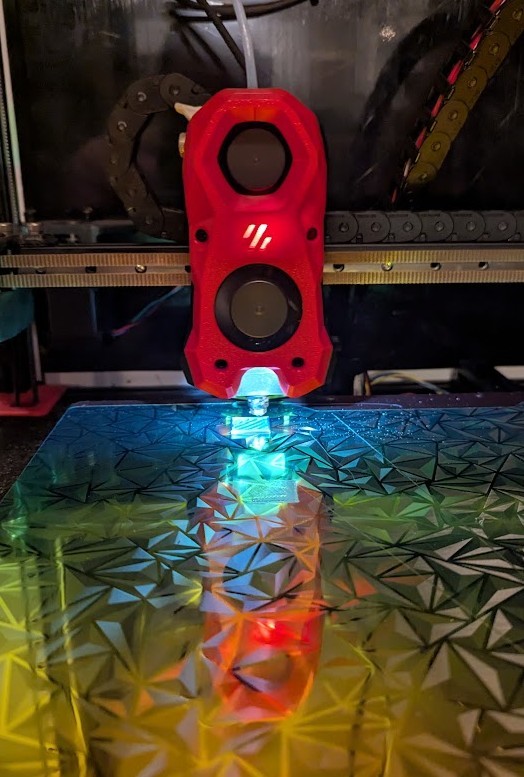
Getting into beginner 3D printing with FDM machines is one of the most fun hobbies you can pick up right now. This guide walks you through what you need to know before you buy a printer, how to set it up, and how to actually get good prints at home.
What Is FDM 3D Printing?
FDM stands for Fused Deposition Modeling. In plain terms, an FDM printer melts plastic filament and draws it out layer by layer to build a 3D object.
Here’s what happens step by step:
- A roll of filament feeds into a heater (the ‘hot end’ of the printer)
- The hot end heats the filament until it softens.
- Gears push the filament through a tiny nozzle, and melted plastic lays down onto the print bed.
- The printer stacks thin layers of plastic until your part is done.
For beginner 3D printing at home, FDM is the most common type. It’s cheaper than resin printing, the materials are less messy, and the machines are fairly easy to understand once you see them run a few times.
Core Parts of an FDM Printer (Beginner-Friendly Breakdown)
Knowing the main parts of your printer makes troubleshooting way easier. Here are the key components you’ll hear about all the time:
Frame
The frame is the skeleton of the printer. A solid metal frame is better than a wobbly plastic one, because any vibration or flex can show up as lines or ripples on your prints.
Print Bed
The bed is the flat surface where your print sticks during printing. It might be:
- Glass
- Textured PEI steel plate
- Magnetic flexible bed
A heated bed helps plastic stick better and reduces warping. Most decent beginner machines have this now.
Hot End and Nozzle
The hot end is the part that heats and melts the filament. The nozzle is the small tip where the melted plastic comes out. Most nozzles are brass and 0.4 mm in diameter, which is a good default for beginners.
Extruder
The extruder is the mechanism that pushes filament into the hot end. There are two main styles:
- Direct drive: Extruder is mounted right on the print head.
- Bowden: Extruder is mounted on the frame and pushes filament through a tube to the hot end.
Direct drive is usually easier for flexible filaments later, but Bowden setups can be lighter and faster. For beginner 3D printing, both work fine.
Motion System
This includes the belts, rods, lead screws, and stepper motors that move the printer. Belts control X and Y in most desktop machines, and a lead screw usually controls the Z axis (up and down).
Control Board and Screen
The control board is the “brain” of the printer. The screen lets you start prints, change settings, and move axes. Some printers have touchscreens; others have a simple knob and text display.
What You Need to Start Beginner 3D Printing
You don’t need a full workshop to get started. Here’s what you actually need on day one.
The Printer
For a first FDM printer, look for:
- Bed size around 220 x 220 x 250 mm or similar
- Heated bed
- Open-source or widely used model (lots of community support)
- Decent reviews for reliability
Common beginner picks (that are often recommended in the community) include Ender-style machines, Prusa-style bedslingers, and newer “fully enclosed” budget printers.
Filament
Filament is your “ink.” For your first rolls, stick with:
- Material: PLA
- Diameter: 1.75 mm (most common)
- Brand: Buy from a known, decently reviewed brand
PLA prints at lower temperatures, smells mild, and doesn’t warp much. For beginner 3D printing, PLA is hands-down the easiest material to learn on.
Tools and Accessories
Some basic items help a lot:
- Flush cutters (for clipping filament and supports)
- Metal scraper or plastic spatula (for removing prints)
- Small hex key set (for assembly and tightening bolts)
- Blue painter’s tape or isopropyl alcohol for bed cleaning
- SD card or USB stick (depending on your printer)
You don’t need fancy upgrade kits right away. Learn the stock machine first.
Computer and Slicer Software
You’ll need a computer to prepare 3D files. The slicer is the software that converts a 3D model into G-code instructions the printer understands.
Popular free slicers:
- Cura
- PrusaSlicer
- OrcaSlicer
Any of these are fine for beginner 3D printing, and most have ready-made profiles for popular printers.
Setting Up Your FDM Printer for the First Time
Most beginner printers arrive “semi-assembled.” It’s more like IKEA furniture than hardcore electronics work.
Unboxing and Assembly Tips
- Lay everything out and match parts to the manual or online guide.
- Tighten loose bolts, but don’t overtighten.
- Check the frame is square: measure diagonals and eyeball that nothing is twisted.
Many popular printers have better assembly videos on YouTube than the paper manual that comes in the box, so it’s worth following a video step by step.
Power and Safety Checks
- Confirm the power switch is set to your region voltage if your printer has a selector.
- Keep the printer on a stable, flat surface.
- Leave space around it so heat can escape and moving parts aren’t blocked.
This is also a good time to plan where you’ll stand or sit while you watch your first few test prints.
Leveling the Bed: The First Skill Every Beginner Needs
Bed leveling is probably the number one frustration for beginner 3D printing, but once you get it, everything else gets easier.
Bed leveling means adjusting the print bed so it’s the same distance from the nozzle across the entire surface.
Manual Bed Leveling
Most budget FDM printers use manual leveling with four knobs under the corners of the bed.
Common manual method:
- Heat the bed and nozzle to normal printing temps (PLA: 60 °C bed, 200 °C nozzle).
- Home all axes.
- Disable steppers in the menu so you can move things by hand.
- Move the nozzle above each corner.
- Use a sheet of regular printer paper between the nozzle and bed.
- Turn the knob until you feel slight friction on the paper.
- Repeat for all corners, then check the center.
You want the nozzle close enough that the first layer squishes a bit, but not so close that filament can’t come out.
Auto Bed Leveling
Some printers have sensors and automatic mesh leveling. These are nice, but they still rely on a reasonably flat bed and correct Z offset (distance from the nozzle to the bed).
You still might have to:
- Set Z offset so the first layer sticks but doesn’t gouge the bed.
- Run the mesh probing routine before first use.
Even with auto leveling, learning how a good first layer looks is key.
Loading Filament and Printing Your First Test
Once the bed is leveled, you can load filament and try a basic print.
Loading Filament
- Preheat the nozzle to PLA temperature (around 200 °C).
- Cut the filament end at an angle so it’s pointy.
- Feed filament into the extruder, then into the hot end until you see it come out of the nozzle.
- Purge a bit more so old filament is cleared out.
If the extruder clicks or grinds, the nozzle might be clogged or the tension is off. For a brand-new printer, it’s usually just a matter of pushing filament firmly until it catches.
Choosing a First Test Print
Skip big complicated models for your very first print. Start with something like:
- A calibration cube (20 x 20 x 20 mm)
- A simple benchy boat
- A flat test plate for checking bed adhesion
Most slicers have built-in sample models, and many printers ship with a test file already sliced on the included SD card.
Slicer Basics for Beginner 3D Printing
The slicer is where you control quality, speed, strength, and print time. It looks complicated at first, but you only need a few key settings to start.
Importing a Model
- Open your slicer and pick your printer profile.
- Import an STL file (3D model file).
- Position it on the bed if needed (many slicers auto-center it).
Core Settings to Learn First
Focus on these beginner settings:
- Layer height:
- 0.2 mm is a good standard starting point.
- Layer height:
- Infill:
- 15–20% for decorative or low-stress parts.
- Infill:
- Wall/perimeter count:
- 2–3 walls is common.
- Wall/perimeter count:
- Print speed:
- Around 50–60 mm/s is safe for most beginner printers.
- Print speed:
- Temperatures:
- PLA nozzle: 195–210 °C
- PLA bed: 50–60 °C
- Temperatures:
Use the recommended profile for your specific printer and filament as a starting point, then tweak slowly from there.
Supports and Adhesion
Some models need supports for overhangs. For your first few prints, choose models that don’t need them, so you learn the basics first.
Common adhesion options:
- Brim: A ring of extra lines around the part for more grip to the bed.
- Raft: A thick base under the part; usually overkill for PLA on a good surface.
For beginner 3D printing, a brim can save a print if corners tend to lift.
Getting a Good First Layer
The first layer is everything. If it sticks well and looks smooth, the rest of the print usually goes fine.
Signs of a good first layer:
- Filament is slightly squished, forming continuous lines with no gaps.
- Lines touch each other without big ridges or holes.
- Nozzle isn’t dragging grooves in the plastic.
Common first-layer problems:
- Too far from the bed: Filament looks like round strings, doesn’t grip, and may curl up.
- Too close: Nozzle scratches the bed, filament feels “choked,” or the extruder clicks.
- Bed dirty: Oils from fingers or dust cause poor adhesion.
For glass or PEI beds, clean with isopropyl alcohol once they are cool. Avoid touching the print surface more than you have to.
Common Beginner Problems and Quick Fixes
Beginner 3D printing always involves some troubleshooting. Here are a few very common issues and simple things to try.
Print Not Sticking to the Bed
Possible causes:
- Bed not level.
- First layer too high.
- Bed too cold.
- Surface dirty.
Things to try:
- Re-level the bed with the paper method.
- Adjust Z offset slightly closer.
- Increase bed temp a bit (from 60 to 65 °C for PLA).
- Clean the bed.
Stringing (Thin Hairs Between Parts)
Possible causes:
- Retraction not set correctly.
- Nozzle temperature too high.
Things to try:
- Turn on retraction in your slicer (if it’s off).
- Lower nozzle temp 5–10 °C and test again.
Under-Extrusion (Gaps and Thin Walls)
Possible causes:
- Filament slipping in the extruder.
- Nozzle partially clogged.
- Incorrect filament diameter setting.
Things to try:
- Check that the filament path is smooth and not kinked.
- Clean or replace the nozzle.
- Confirm slicer is set to 1.75 mm filament if that’s what you use.
Layer Shifts
Possible causes:
- Belts too loose.
- Obstruction on the bed or axis.
- Printer frame not stable.
Things to try:
- Tighten belts so they are firm but not guitar-string tight.
- Check that cables aren’t catching on the printer.
- Make sure the printer is on a solid surface.
Safety and Good Habits for Home 3D Printing
Even beginner 3D printing involves heat, moving parts, and plastic fumes, so a few basic habits go a long way.
- Ventilation: Use the printer in a room with some airflow, especially for materials other than PLA.
- Heat: Don’t touch the hot end or bed when they’re hot. The nozzle can easily reach 200+ °C.
- Supervision: For long prints, check on the printer now and then. Many people avoid running prints overnight until they trust their setup.
- Fire safety: Keep a small fire extinguisher in the area and avoid clutter around the printer.
PLA is generally one of the safer filaments to run indoors, which is another reason it’s popular with beginners.
Smart Next Steps After Your First Successful Prints
Once you’ve run a few calibration prints and simple models, you can start to expand your beginner 3D printing skills.
Ideas for next steps:
- Try different PLA brands to see what gives the best results on your printer.
- Experiment with small changes to layer height, temperature, and speed.
- Learn basic 3D modeling with free tools like Tinkercad or Fusion 360 for custom parts.
- Join online groups or forums for your printer model for tips and troubleshooting.
Upgrades like better bed surfaces, quieter fans, or auto bed leveling can come later, once you know what actually bothers you about the machine.
Conclusion
Beginner 3D printing with FDM machines is very approachable if you break it into steps: pick a decent printer, assemble it carefully, level the bed, and learn what a good first layer looks like. Once you get past that first learning hump, printing useful and fun objects at home becomes pretty routine. Take your time, change only a few settings at once, and you’ll build solid skills faster than you might expect.