
Resin 3D Printing for Beginners
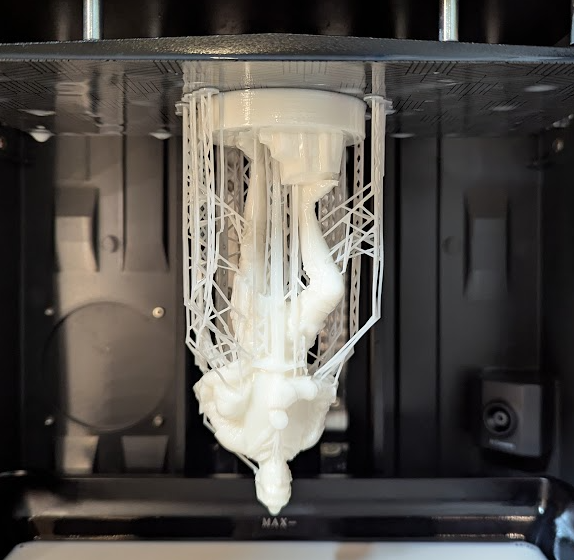
Resin printing uses liquid photopolymer resin that hardens when exposed to UV light. A resin printer cures this liquid layer by layer to build your model from the bottom up.
This process is called vat photopolymerization. In hobby printers, that usually means an LCD or DLP screen shines UV light in the shape of each layer through a clear film at the bottom of a resin vat.
Resin vs FDM: Which Is Better for Beginners?
Most people compare resin printers to filament (FDM) printers. FDM uses melted plastic filament. Resin uses liquid resin and UV light.
Here’s a quick comparison that helps beginners decide:
Print quality
Resin gives much finer detail and smoother surfaces than FDM. It is great for miniatures, models, and parts with tiny text or sharp features.Ease of use
FDM feels less messy since it uses solid filament. Resin adds extra steps: dealing with liquid resin, washing, and curing.Safety and mess
Uncured resin and alcohol are chemicals you handle directly. You need gloves, good airflow, and decent cleanup habits.Strength and function
FDM parts are usually tougher for everyday functional parts. Many basic resins are more brittle, though special “tough” resins exist.
For many people, a small resin printer is a great first or second machine if the main goal is high detail rather than utility parts.
Types of Resin 3D Printers
Most hobby resin printers use one of these technologies:
MSLA (LCD) Printers
The most common type for beginners
Uses an LCD screen with UV LEDs behind it
The screen blocks or passes UV light to cure each layer
Good balance of speed, cost, and quality
DLP Printers
Uses a digital projector to flash the whole layer at once
Often sharper pixels, good for small detailed parts
Usually more expensive and less common in budget ranges
For resin printing for beginners, almost every starter machine is an MSLA printer, so that’s what this guide mainly refers to.
Basic Parts of a Resin Printer
Knowing the parts helps you understand guides, videos, and troubleshooting info.
Key parts:
Build plate
Metal platform your print sticks toResin vat
Tray that holds the liquid resinFEP or ACF film
Clear film at the bottom of the vat where the light passes throughLCD screen / light engine
Shows each layer image in UV lightZ-axis rail and motor
Moves the build plate up and downCover or hood
Blocks outside light and reduces fumes
How Resin Printing Works (Step by Step)
You pour resin into the vat.
The build plate lowers close to the transparent film.
UV light shines through the screen and cures a thin layer of resin stuck to the build plate or previous layer.
The plate lifts slightly, peeling the cured layer from the film.
New liquid resin flows under the part.
The next layer cures.
This repeats until the model is done.
Each layer is usually between 0.02 mm and 0.05 mm thick, which is why resin prints look so smooth.
Safety Basics for Resin Printing for Beginners
Safety is a big part of resin printing. Uncured resin can irritate skin and eyes and is not good to breathe for long periods.
Main safety habits:
Gloves
Use disposable nitrile gloves when handling liquid resin, dirty prints, or resin-covered tools.Ventilation
Print in a space with fresh air flow. An open window and a small fan can help. Do not run the printer in a tiny closed room you sit in for hours.Eye protection
Safety glasses help if there is any risk of splashes.No food and drinks nearby
Keep snacks and drinks away from the printing area.Spill cleanup
Wipe spills with paper towels, then clean the area with isopropyl alcohol (IPA) or the cleaner recommended by your resin. Cure used towels in sunlight or a curing station before throwing them away.Skin contact
If resin touches your skin, wipe it off with a paper towel, then wash with soap and water.
Once the print is fully cured, it is safe to handle like normal plastic.
Types of Resin and What They’re Good For
Resins are not all the same. Choosing the right one matters for resin printing for beginners.
Common types:
Standard resin
Crisp detail but more brittle. Good for miniatures and display models.ABS-like or tough resin
Less brittle, better for small functional parts and things that might get dropped.Flexible or elastic resin
Bends without snapping. Used for gaskets, soft parts, or special effects.Water-washable resin
Can be cleaned with water instead of alcohol. Easier in some ways, but uncured resin in water still counts as chemical waste and should be cured before disposal.High-temperature resin
Designed for parts that face heat. Usually more expensive and more advanced.
For your first bottle, a popular “standard” or “ABS-like” resin from a known brand is a good starting point.
Choosing Your First Resin Printer
Key things to look at:
Build volume
How big the printer can print. Many starter machines have about 120 × 68 × 150 mm build area, which is plenty for minis and small parts.Screen resolution
Higher resolution (like 4K or 8K) on a small screen means higher detail. For most beginners, any 2K or 4K small printer already looks very sharp.Ease of leveling
Look for simple, guided leveling processes.Community and support
A popular model has more guides, profiles, and help online.Spare parts
Check if replacement FEP/ACF films and screens are easy to buy.
A small, common MSLA printer with a 4K screen is a nice balance of cost and quality for beginners.
Slicer Basics for Resin Printing
The slicer prepares your 3D model for the printer.
Popular slicers for resin printing:
Chitubox
Lychee Slicer
PrusaSlicer (for certain resin machines)
Key settings to learn:
Layer height
Common values: 0.05 mm for general prints, 0.03 mm or 0.02 mm for extra detail. Smaller layers give higher quality but longer print time.Bottom layers and exposure
The first few layers (like 4–8 layers) use extra long exposure to stick the print firmly to the build plate.Normal layer exposure time
How long each standard layer is cured. This depends on your resin and printer. Many brands share recommended times, and there are community “exposure finder” tests.Lift speed and distance
How far and how fast the plate moves between layers. Slower lifting can help prints stick and reduce stress on the part.
Slicers often include preset profiles for popular printers and resins, which are helpful starting points.
Supports, Orientation, and Hollowing
These three topics affect success rates a lot.
Supports
Resin prints often need supports, even more than FDM, because entire sections can be “floating” in the liquid.
Basic tips:
Angle parts so there are fewer flat horizontal surfaces.
Use medium supports for heavier sections and lighter supports for small details.
Make sure there is a solid “support tree” leading from the build plate to every overhanging area.
Orientation
How you rotate the model matters.
Angling the model 20–45 degrees can reduce suction and layer lines.
Sharp corners print better when they do not face straight down.
Logos and fine details look smoother if they are not perfectly parallel to the build plate.
Hollowing
Hollowing saves resin and reduces forces on the part.
Use the slicer’s hollow function to hollow models with a wall thickness of about 1.5–2.5 mm to start.
Add drainage holes so trapped resin can flow out.
Place holes where they are easy to hide or plug later.
If you do not hollow larger models, they can use a lot of resin and put more stress on the FEP.
Printing Your First Test Model
For resin printing for beginners, a test print helps dial in basic settings.
Simple plan:
Level the build plate following your printer’s manual. This step is critical.
Load a test file from the printer’s USB stick or download a known-good test model.
Use a known resin profile from your slicer or from the community for your exact printer and resin.
Print the test and watch the first few layers to confirm the plate moves and nothing scrapes too hard.
If the test turns out well, move on to your own models. If not, adjust leveling or exposure time.
Cleaning, Curing, and Handling Finished Prints
Your print is not done when the machine stops. It still has liquid resin on it and is only partially cured.
Step 1: Remove the print
Wear gloves.
Use the metal scraper or a plastic wedge to slide under the edges on the build plate.
Be gentle to avoid gouging the plate or cutting yourself.
Step 2: Washing
Place the print in a container with IPA or wash fluid.
Swirl gently or use a wash station for a couple of minutes until the surface is free of shiny liquid resin.
You can do a second rinse with fresh IPA if needed.
Step 3: Drying
Let the print air dry for a few minutes or blow it gently with compressed air.
Check for sticky or glossy spots that might need more washing.
Step 4: Curing
Put the washed, dry print into a curing station or out in direct sunlight.
Rotate it so all sides cure evenly.
Check your resin bottle for suggested curing time, often 2–10 minutes depending on size.
After full curing, the print is safe to handle, sand, drill, and paint.
Common Problems and Simple Fixes
Beginners often run into the same issues in their first weeks.
Print not sticking to the build plate
Possible causes and fixes:
Plate not level or not tight
Bottom exposure too low
Plate surface too smooth or dirty
Ways to help:
Re-level the plate carefully.
Increase bottom layer exposure time.
Lightly scuff the plate with fine sandpaper if recommended by the maker.
Print stuck to FEP or layer shifts
Possible causes:
Too low normal exposure
Lift speed too fast
Supports too weak or too few
Try:
Increase normal layer exposure a bit.
Slow down lift speed.
Add more or thicker supports under heavy parts.
Cloudy or damaged FEP film
Over time the FEP gets cloudy or scratched and can cause failed prints.
Replace the FEP when it looks hazy, deeply scratched, or prints keep failing.
Tighten it evenly so it sounds like a drum when tapped lightly.
Storing Resin and Printer Maintenance
Good habits extend the life of your printer and resin.
Storing resin
Keep bottles closed, in a cool, dark place. Shake well before use. If resin sits in the vat for more than a few days, stir it and check for chunks before printing.Filtering resin
After a failed print, pour resin through a paint filter or fine mesh into a clean bottle to remove cured bits.Keeping the printer clean
Wipe drips from the vat and body of the printer. Do not scratch the FEP or LCD screen. Use soft cloths.Checking screws and rails
Make sure the Z-rail and plate mount feel solid, not wobbly.
These small steps prevent many prints from failing later.
Is Resin Printing Right for You?
Resin printing for beginners fits people who:
Care about very fine detail in figures, models, and props
Don’t mind a bit of extra cleanup and post-processing
Have a spot with some ventilation and space for washing and curing
If you want quick, tough brackets and household parts with less mess, an FDM printer might be a better first machine. Many hobbyists end up using both.
Conclusion
Resin printing for beginners looks tricky at first, but once you learn the steps, it becomes a steady routine. You prepare the file, level the plate, print, wash, and cure, and each run teaches you a bit more. Start with a small printer, a reliable resin, and good safety habits, and your prints will get better with every build.